
Vida en el Valle has a new home
Dear readers,
We’ve moved the Vida en el Valle website and eEdition so we can provide you with an improved digital experience. Vida stories and videos will be available at www.fresnobee.com/vida-en-el-valle.
We’ve expanded Vida’s already close relationship with The Fresno Bee – the central San Joaquin Valley’s largest newsroom. As of last year, we are a charter member of the Central Valley News Collaborative, a philanthropy-funded bilingual local news initiative that provides coverage on the issues that matter most to you.
Here’s how to access our coverage:
If you are looking for real-time updates, download The Fresno Bee news app for iPhone and iPad or Android.
For readers who follow our eEdition, you can find the same content you’ve enjoyed in a new location online or in our new-and-improved Fresno Bee apps.
Visit us on the Vida en el Valle section of The Fresno Bee website on your desktop or mobile device.
Thank you, and keep reading.
Juan Esparza Loera
Editor, Vida en el Valle
• • •
Estamos moviendo el sitio de Vida en el Valle y eEdition para ofrecerle una experiencia digital mejorada. Las historias y videos de VIDA estarán disponibles en www.fresnobee.com/vida-en-el-valle.
Hemos ampliado la relación de Vida con The Fresno Bee: la prensa más grande del centro del Valle de San Joaquín Central. Desde el año pasado, somos miembros de Noticias Colaborativas del Valle Central, una iniciativa de noticias bilingües financiado por la filantropía que proporciona cobertura sobre los problemas que más importan.
Aquí es cómo acceder a nuestra cobertura:
Si está buscando actualizaciones en tiempo real, descargue la aplicación Fresno Bee News para iPhone y iPad o Android.
Para los lectores que siguen nuestra eEdition, puede encontrar el mismo contenido que ha disfrutado en una nueva ubicación en línea [https://www.vidaenelvalle.com/e-edition/today] o en nuestras nuevas y mejoradas aplicaciones de Fresno Bee.
Visítenos en la sección Vida en El Valle del sitio web de Fresno en su escritorio o dispositivo móvil.
Gracias, y sigue leyendo.
Juan Esparza Loera
Editor, Vida en el Valle
HOW TO FIND VIDA EN EL VALLE COVERAGE IN THE FRESNO BEE APP
Coverage can be found under the Vida en el Valle section.
Download the app for iOS or Android. If you already have the app, make sure you’ve updated to the latest version.
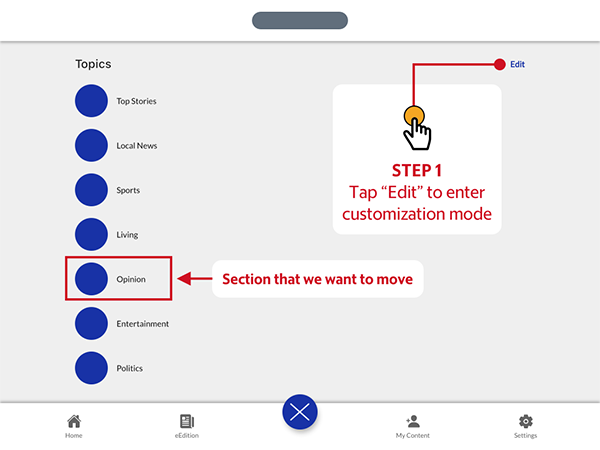
Tap the large blue circular button located toward the bottom of your screen to open the Topics screen. From there, tap the “Edit” button in the top right corner of the screen.
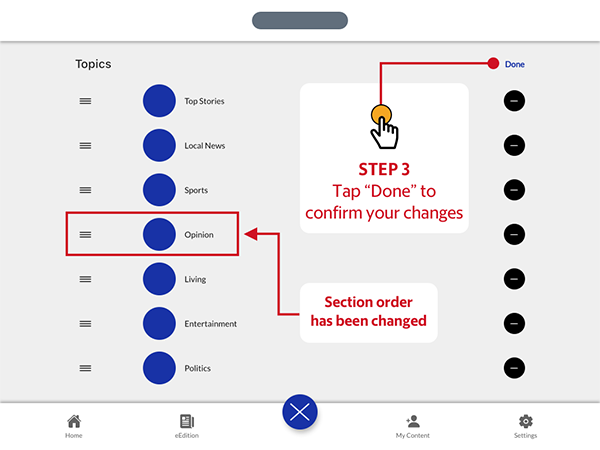
To change the order of the topics, tap and hold the grabber icon on the left of the topic label to lift it up and out of the list, then drag it up or down to adjust the order. The other topic labels will make way for your selection, allowing you to drop the label when you find the right spot.

When you are satisfied with your topic order, tap the “Done” button in the top right corner of the app screen to return to the Topics screen. Additionally, you may also tap the blue circular button toward the bottom of the screen, which will now display a white “X” in the center, to immediately return to the Home Feed screen.
For more information on how to use the app please see our user guide.
If you need additional assistance, please contact customer service.
CÓMO ENCONTRAR LA COBERTURA DE VIDA EN EL VALLE EN LA APLICACIÓN DEL FRESNO BEE
Descarga la aplicación para iOS o Android. Si ya tiene la aplicación, asegúrese de haberla actualizado a la última versión.
Toque el botón circular azul grande ubicado en la parte inferior de la pantalla para abrir la pantalla Temas. Desde allí, toque el botón “Editar” en la esquina superior derecha de la pantalla.
Para cambiar el orden de los temas, toque y mantenga presionado el ícono de captura a la izquierda de la etiqueta del tema para levantarlo y sacarlo de la lista, luego arrástrelo hacia arriba o hacia abajo para ajustar el orden. Las otras etiquetas de temas darán paso a su selección, lo que le permitirá soltar la etiqueta cuando encuentre el lugar correcto.
Cuando esté satisfecho con el orden de los temas, toque el botón “Listo” en la esquina superior derecha de la pantalla de la aplicación para volver a la pantalla Temas. Además, también puede tocar el botón circular azul hacia la parte inferior de la pantalla, que ahora mostrará una “X” blanca en el centro, para volver inmediatamente a la pantalla de Inicio.
Para obtener más información sobre cómo utilizar la aplicación, consulte nuestra guía del usuario.
Si necesita ayuda adicional, comuníquese con el servicio de atención al cliente.
Esta historia fue publicada originalmente el 9 de agosto de 2021, 3:41 p. m..