
The Sierra Star has a new home
Dear readers,
We’ve moved our Sierra Star website, app and eEdition to The Fresno Bee so we can provide you with an improved digital experience. Our exclusive content will move to a new home where we will continue to share news, features and updates.
Here’s how to access our coverage:
If you are looking for real-time updates, download The Fresno Bee news app for iPhone and iPad or Android.
eEdition readers can look for the Sierra Star section in The Fresno Bee eEdition each week on Thursdays.
Visit us on the Sierra Star section of The Fresno Bee website on your desktop or mobile device.
Subscribers will have full access to all content. Readers without a subscription will have limited access.
Thank you, and keep reading.
Joe Kieta, Editor
jkieta@fresnobee.com
HOW TO FIND SIERRA STAR COVERAGE IN THE FRESNO BEE APP
Coverage can be found under the Sierra Star section.
Download the app for iOS or Android. If you already have the app, make sure you’ve updated to the latest version.
Tap the large blue circular button located toward the bottom of your screen to open the Topics screen. From there, tap the “Edit” button in the top right corner of the screen.
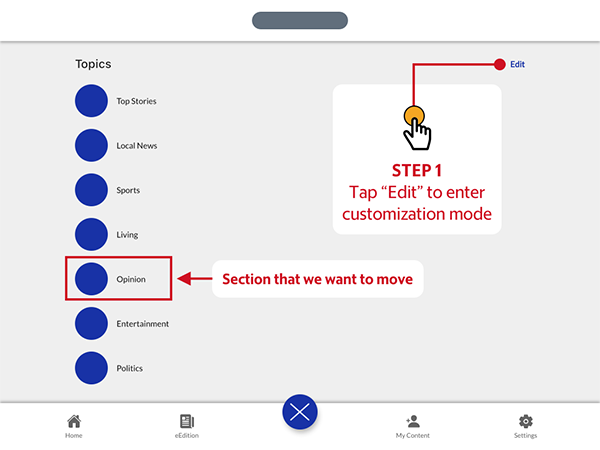
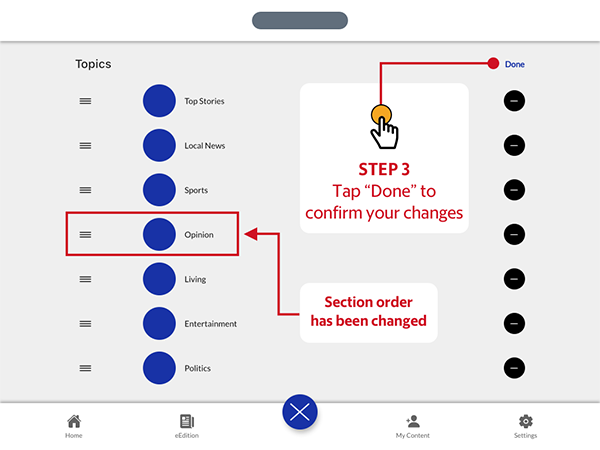
To change the order of the topics, tap and hold the grabber icon on the left of the topic label to lift it up and out of the list, then drag it up or down to adjust the order. The other topic labels will make way for your selection, allowing you to drop the label when you find the right spot.

When you are satisfied with your topic order, tap the “Done” button in the top right corner of the app screen to return to the Topics screen. Additionally, you may also tap the blue circular button toward the bottom of the screen, which will now display a white “X” in the center, to immediately return to the Home Feed screen.
For more information on how to use the app please see our user guide.
If you need additional assistance, please contact customer service.
This story was originally published August 9, 2021 at 3:31 PM.